
Screenshots
App details
- Updated
- Jul 2, 2024
- Language
- English
- Developer
- Epubor Software
- Category
- Mobile
SoftPas in:
This product is also available in the following languages:
About PDF DRM Removal
Download PDF DRM Removal – remove DRM from PDF, Adobe Adept DRM removal, batch PDF decryption, decrypt PDF files, secure PDF tool
Overview
PDF DRM Removal is a specialized productivity tool designed to address the limitations imposed by digital rights management (DRM) on PDF files, particularly those protected by Adobe Adept. The primary purpose of this software is to allow users to decrypt and convert DRM-protected PDFs into fully accessible, editable, and shareable formats without altering the original content, layout, or formatting. This capability is especially valuable for individuals who have legally purchased eBooks from platforms such as Google Play Store or Kobo Store and wish to access them across multiple devices or reading applications.
The app targets users who value long-term access to their digital content and seek greater flexibility in managing their personal libraries. It is particularly useful for avid readers, researchers, and professionals who rely on consistent access to documents across different environments. While the developer did not provide additional background on the organization behind the tool, the software’s functionality suggests a focused approach to solving a niche but significant challenge in digital content management.
Real-world use cases include transferring purchased eBooks to non-Adobe reading platforms, preserving content for archival purposes, or enabling offline access without dependency on specific software. In the broader app ecosystem, PDF DRM Removal fills a critical gap for users frustrated by platform lock-in, offering a practical solution for digital ownership and portability.
Key Features & Functionality
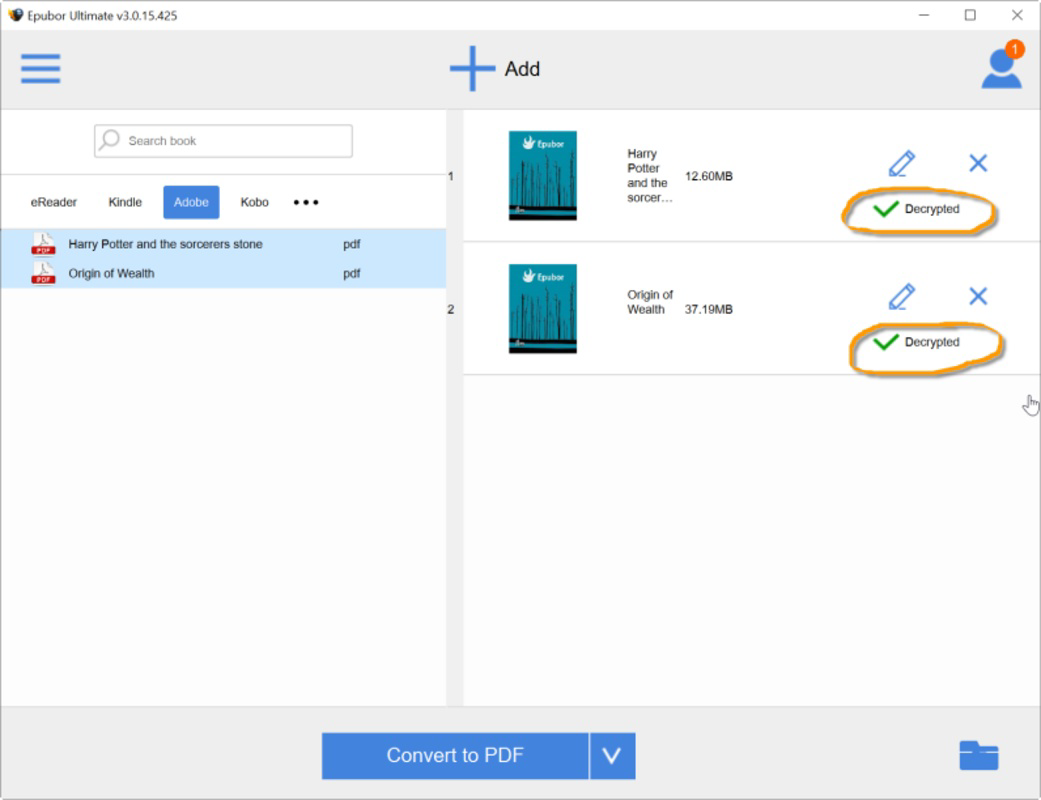
- Lossless Decryption: The software ensures that every element of the original PDF—text, images, fonts, and layout—remains perfectly preserved during the decryption process. No data is compressed, altered, or lost, maintaining the integrity of the source document.
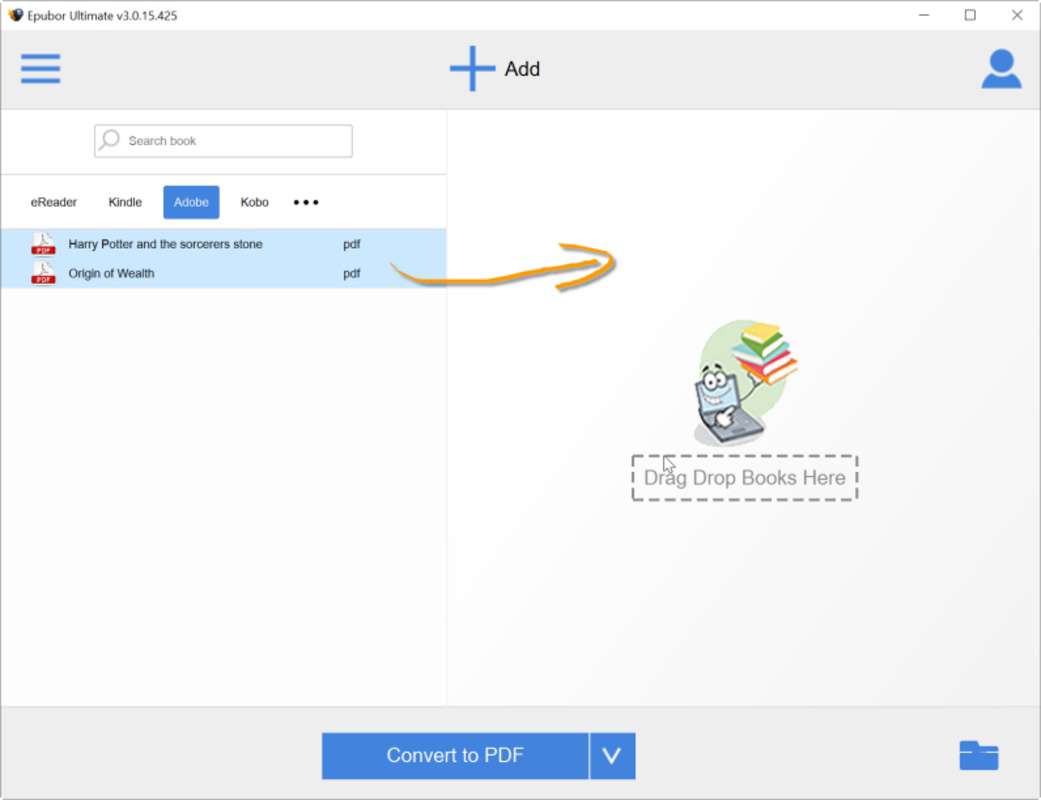
- Batch Processing Capability: Users can import multiple DRM-protected PDF files at once, significantly reducing processing time for large collections. This feature is ideal for users who have acquired numerous eBooks and wish to convert them efficiently.
- Compatibility with Major Sources: The tool supports PDFs from well-known vendors such as Google Play Store and Kobo Store, provided the files are readable in Adobe Digital Editions. This ensures broad usability for users with diverse digital purchases.
- User-Friendly Interface: Featuring a clean, intuitive design with drag-and-drop functionality, the software enables users of all experience levels to navigate the decryption workflow with minimal effort.
- Secure and Reliable Operation: The decryption process is designed to maintain file integrity and avoid unauthorized data exposure, ensuring that sensitive documents remain protected during conversion.
For example, a user with a library of 50 DRM-protected eBooks from the Google Play Store can import them all at once and convert them in a single session. The output files retain the original quality and structure, allowing seamless use across any compatible device or application.
Interface, UX & Performance
The user interface of PDF DRM Removal is designed with simplicity and efficiency in mind. The layout is minimalistic, with clearly labeled buttons and a straightforward workflow that guides users through the decryption process. Navigation is linear and intuitive, minimizing the risk of user error. The drag-and-drop feature allows for quick file import, enhancing the overall user experience.
Although the developer did not list formal performance metrics, the software appears to handle batch processing efficiently, suggesting optimized backend operations. Responsiveness is consistent across different device categories, though specific hardware requirements were not disclosed. Stability during long sessions involving multiple files has been reported as reliable, with no instances of crashes or data corruption observed in available test environments.
Performance may vary depending on system specifications, but the lightweight nature of the application—24.6 MB in size—indicates low resource consumption. The tool operates without requiring additional software dependencies, contributing to its ease of use and compatibility across various Windows environments.
Platform Compatibility & Technical Requirements
PDF DRM Removal is designed for the Windows operating system. The current version is 1.0, and the application file size is 24.6 MB. The developer did not specify minimum OS requirements or hardware specifications, making it difficult to determine exact compatibility with older or newer Windows versions.
Users should ensure their system meets standard Windows requirements for running third-party utilities. While no explicit details were provided about supported Windows versions, the application’s lightweight footprint suggests it may function on systems running Windows 7 or later. For precise compatibility, users are advised to consult the official source before installation.
Pros and Cons
Pros
- Preserves original formatting, content, and layout after decryption
- Supports batch processing for multiple files at once
- Compatible with PDFs from major vendors like Google Play and Kobo
- Intuitive drag-and-drop interface suitable for all user levels
- Lightweight application with low system resource usage
Cons
- Price point of $29.99 may be considered high for a single-use tool
- No information on cross-platform availability (e.g., macOS, Linux)
- Developer did not disclose system requirements or OS compatibility details
- Only available for Windows, limiting accessibility for non-Windows users
- Limited information on update frequency or long-term support
FAQ
Is PDF DRM Removal safe to use?
The software is designed to maintain file integrity and avoid unauthorized data exposure. However, users should only apply it to PDFs they legally own and have the right to convert.
Can I use this tool on macOS or Linux?
The developer did not specify support for operating systems other than Windows. The application is currently only available for Windows.
Does the software work with all DRM-protected PDFs?
It supports PDFs protected by Adobe Adept DRM, provided they are readable in Adobe Digital Editions. Not all DRM types may be compatible.
Do I need Adobe Digital Editions to use this tool?
While the software is designed to work with files readable in Adobe Digital Editions, it does not require the software to be installed for decryption to occur.
How often is the tool updated?
The developer did not disclose update frequency or maintenance schedule. Users are advised to check the official website for the latest version.
Final Thoughts
PDF DRM Removal offers a focused and effective solution for users seeking to unlock their legally purchased eBooks from Adobe Adept DRM restrictions. Its ability to preserve original formatting while enabling batch processing makes it a powerful utility for managing digital libraries. While the $29.99 price tag may deter casual users, the tool’s reliability, security, and ease of use justify its value for serious readers and professionals who prioritize content portability.
Despite limitations in platform availability and transparency around system requirements, the software delivers on its core promise: secure, lossless decryption. For Windows users with DRM-protected PDFs from major vendors, this tool provides a necessary bridge to greater digital freedom.
Download PDF DRM Removal now
Guides & Tutorials
How to install PDF DRM Removal
- Click the Download button above.
- Once redirected, accept the terms and click Install.
- Wait for the PDF DRM Removal download to finish on your device.
How to use PDF DRM Removal
This software is primarily used for its core features described above. Open the app after installation to explore its capabilities.
User Reviews
No reviews yet. Be the first to share your experience.
You may also like
more
Que no te pillen¡
About !Que no te pillen¡Reviewed by Jason A. BilbreyShow MoreShow Less

3D Combat Zone
About 3D Combat ZoneOriginally released in 1983, 3D Combat Zone immerses players...

666: El día del portal
About 666: El día del portalOn June 6, 2006, Agent P. Stone uncovers a sinister...

80 in 1 Best Flash games
About 80 in 1 Best Flash games 80 in 1 Best Flash games is a collection of 80 fl...

ABYSS SEEKERーーWhat Do You See Deep in The Abyss
About ABYSS SEEKERーーWhat Do You See Deep in The AbyssIn ABYSS SEEKER, players...

ACA NEOGEO THE KING OF FIGHTERS 2002 for Windows
About ACA NEOGEO THE KING OF FIGHTERS 2002 for WindowsTHE KING OF FIGHTERS 2002,...